Free online tool · AUTOSAR ARXML
Compare two ARXML files online
Open two versions of an AUTOSAR ARXML file, such as two ECU extracts, and see how many signals, PDUs, frames, ports and components were added, removed or modified, or that nothing changed. Elements are matched by AR-PATH, in any order; UUIDs, ADMIN-DATA and timestamps are ignored.
- Read in this browser tab: the page is not allowed to send your files anywhere
- No account
- Up to 60 MB per file
- The comparison engine of the ARXML Compare extension
This comparison runs in your browser: turn on JavaScript to use it.
The sample extracts were written by Novair and describe no real vehicle.
How the online comparison works
Matched by AR-PATH
Each element with a SHORT-NAME is identified by its AR-PATH, so the order of the file does not matter. A renamed or moved element shows as removed and added.
Only real changes
UUIDs, ADMIN-DATA, timestamps and descriptions are ignored, and numbers are compared by value: 0x10 and 16 are the same.
Counted by domain
Signals, PDUs, frames (CAN, CAN FD, LIN, FlexRay), ports and interfaces, components, and every other element: added, removed, modified.
Which signals changed, and how?
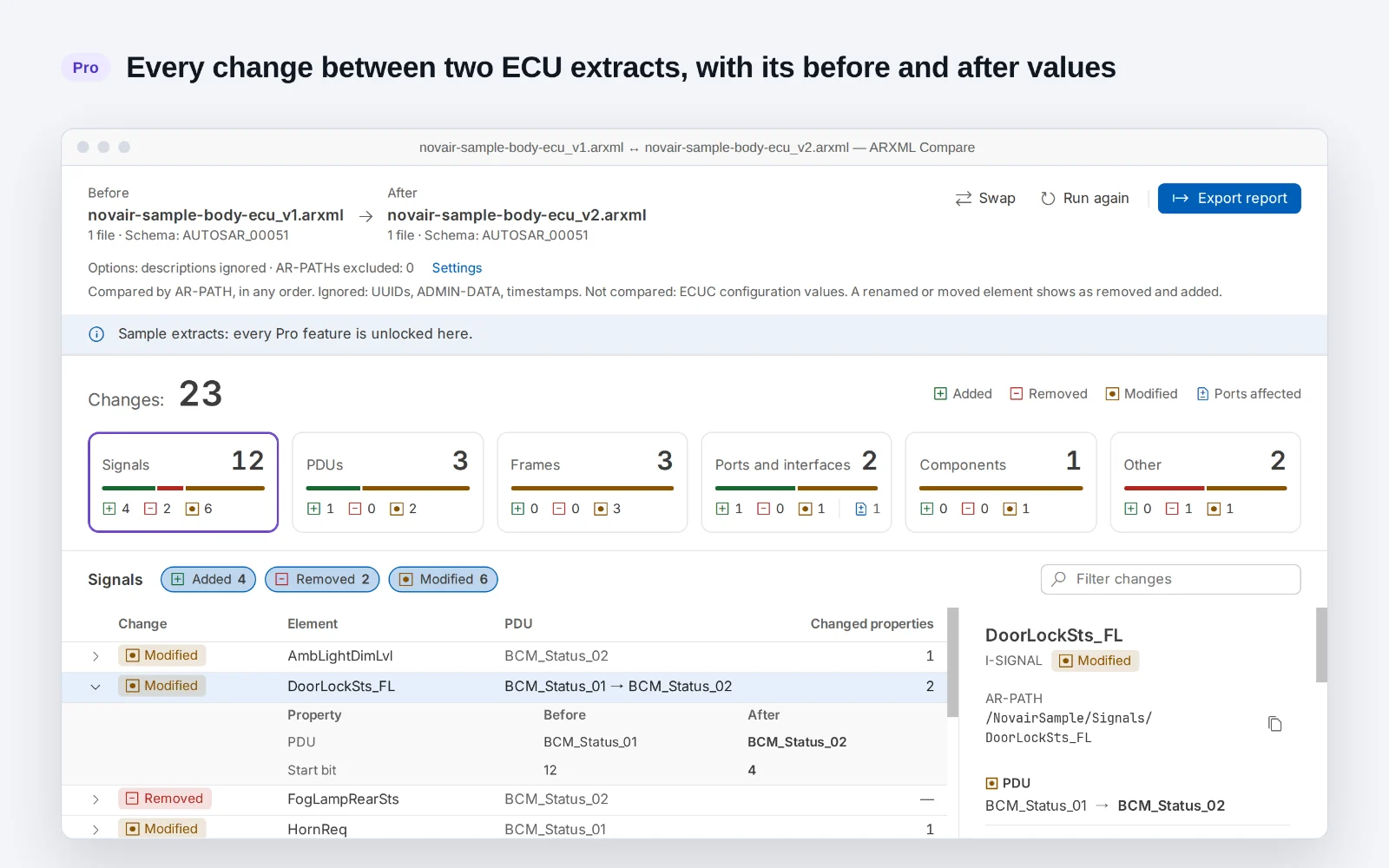
AUTOSAR ARXML viewer and compare for VS Code: browse signals, PDUs, frames and ports, and see how many changed between two ECU extracts. Pro lists each change with its before and after values and exports the report to Excel. No AUTOSAR tool licence needed, and your files stay on your machine.
- Every change with its before and after values
- Open any change at its line in the before or after file
- Report to Excel (.xlsx), CSV or HTML, one sheet per domain, ready to filter and send
- Pro: EUR 129 + VAT where applicable. One payment, no subscription. All 1.x updates included. Refund within 14 days.
Questions
Are my ARXML files sent anywhere?
No. This page reads them in your browser with the comparison engine of the ARXML Compare extension. Its Content-Security-Policy (connect-src 'none') forbids any network request, and it keeps nothing once you close the tab.
What is compared, and what is not?
Compared: signals, PDUs, frames (CAN, CAN FD, LIN, FlexRay), ports and interfaces, software components, and every other element that has a SHORT-NAME, by AR-PATH and in any order. Ignored: UUIDs, ADMIN-DATA, timestamps and, by default, descriptions. Not compared: ECUC configuration values. A renamed or moved element shows as removed and added. Variants are compared as written, not resolved. Tables read AUTOSAR 4 files (schema r4.0); AUTOSAR 3 files open in the tree only. Ethernet: PDUs only, with no table for sockets or SOME/IP services (their changes appear under Other).
Can I see each change and its values?
This page shows how many elements changed in each domain. ARXML Compare Pro, in VS Code, lists each change with its before and after values, opens it at its line in the file, and exports the report to Excel, CSV or HTML. You can try every Pro feature on the sample extracts of the free extension before buying.
My extract is large, or split into several files
This page reads one file per side, up to 60 MB each. The free extension reads files in a stream from disk, is tested with 200 MB files, and opens a folder of ARXML files as one model; comparing two folders is in Pro.